Short answer
Are touchscreen red light panels more reliable than button controls?
Mechanical buttons and cord switches generally offer greater long term durability because they use basic physical contacts without digital displays or microprocessors. Touchscreens provide precision timers and custom modes, but additional electronic components carry a higher risk of circuit failure over time. Simple mechanical switches rarely fail under ordinary indoor home use.
When setting up a panel next to your bed or hanging it behind a bedroom door for a morning recovery routine, choosing a touchscreen red light panel vs button control comes down to whether you prioritize integrated digital menus or simple tactile operation. Touchscreen panels consolidate session timers, channel controls, and mode adjustments into a single digital display, but require looking at the screen during setup. Physical buttons and cord switches provide direct mechanical feedback, allowing effortless tactile control that you can operate by feel without looking at a screen.
This guide examines how digital touchscreens compare to mechanical switches across daily usability, long term durability, and electrical requirements, alongside three panels evaluated from stated maker specifications. Listings were collected 13 October 2026.
This article is informational and is not medical advice. Red light and near-infrared therapy devices emit concentrated light that can cause eye strain or discomfort. Always wear appropriate eye protection during sessions and consult a healthcare professional before treating chronic pain or medical conditions. See our Medical Disclaimer.
Chillveda earns a commission when you buy through links on this page, at no extra cost to you. As an Amazon Associate I earn from qualifying purchases. Affiliate disclosure.
Quick picks
-
1
 Red Light Therapy Panel, 660nm & 850nm Chill Score 9.6/10Check price on Amazon
A 100 watt steel panel with a 1.77 inch LCD touchscreen, dual channel control, pulse modes, remote control, and a 3 year warranty.
-
2
 45W Red LED Light Therapy Panel Chill Score 9.4/10Check price on Amazon
A lightweight 45 watt plastic panel offering 660nm and 850nm wavelengths with a simple inline cord switch.
-
3
 Red Light Devices for Face Full Body Red Light Chill Score 9.2/10Check price on Amazon
A 60 watt panel with 338 LEDs covering a 22 inch surface, though its listing contains conflicting specs and no stated warranty.

A 100 watt steel panel with a 1.77 inch LCD touchscreen, dual channel control, pulse modes, remote control, and a 3 year warranty.
Pros & ConsViewHide
Pros
- 1.77 inch LCD touchscreen with 6-key touch interface
- Independent 660nm and 850nm channels plus 9 pulse modes
- SPCC iron housing with quiet cooling fans and remote control
- 3 year manufacturer warranty stated
Cons
- Heaviest unit here at 7.5 pounds
- Higher power consumption at 100 watts
- No independent safety certification listed
- Digital screen requires looking at the panel to program

A lightweight 45 watt plastic panel offering 660nm and 850nm wavelengths with a simple inline cord switch.
Pros & ConsViewHide
Pros
- Dual wavelengths stated at 660nm and 850nm
- Lightweight build at 1.98 pounds for easy hanging
- Simple 1.5m cord with inline switch needs no programming
- Low power draw of 45 watts
Cons
- Plastic housing rather than metal
- No built-in timer or automatic shut-off
- No concrete warranty term stated
- Listing claims FDA registered without medical device clearance
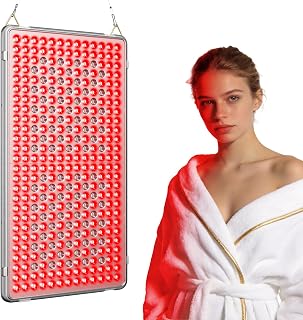
A 60 watt panel with 338 LEDs covering a 22 inch surface, though its listing contains conflicting specs and no stated warranty.
Pros & ConsViewHide
Pros
- 338 LEDs across a large 22 by 11.81 inch panel
- Stated 60 degree beam angle
- Slim 0.7 inch depth
- Door hanging hardware supported
Cons
- Contradictory weight figures of 3.0, 3.3, and 3.52 pounds
- Listing confuses 660nm red light with infrared
- No timer, remote, or stated warranty term
- No independent safety certification listed
More to compare
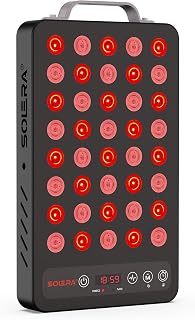 SOLRA Near Infrared Red Light PanelCheck price on Amazon
 Red Light Therapy Panel for Face andCheck price on Amazon
 BONTANNY Red Light Therapy Full Body PanelCheck price on Amazon
 EmberTouch 115W Red Light Therapy PanelCheck price on Amazon
 BestQool Red Light Therapy Panel for BodyCheck price on Amazon
 Red Light Therapy Panel for Face & BodyCheck price on Amazon
Touchscreen red light panel vs button control: control types compared
The control interface of a red light therapy panel determines how you interact with the device during every session. Touchscreens integrate a digital LCD panel and touch-sensitive keys to navigate multiple settings, whereas button controls rely on physical rocker switches or inline cord switches to open and close electrical circuits directly.
| Control interface | Representative model | Stated features and controls | Power and construction |
|---|---|---|---|
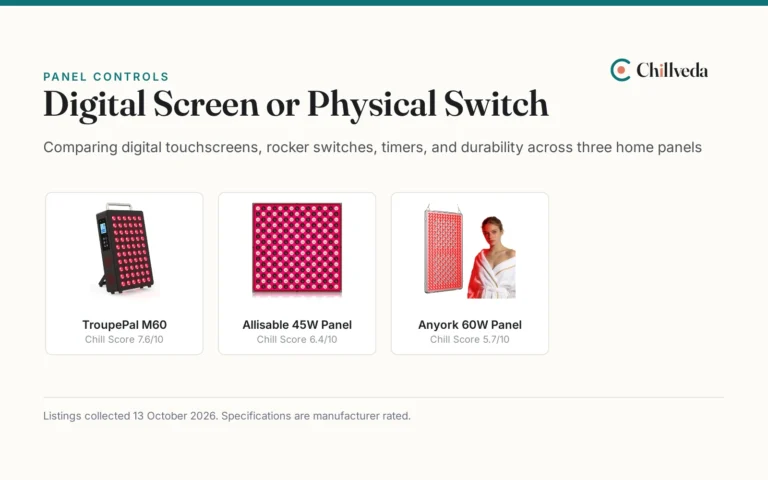
| Digital LCD touchscreen | TroupePal M60 | 1.77-inch LCD, 6-key touch control, timer, remote, 9 pulse modes | 100W, SPCC iron housing |
| Inline cord switch | Allisable 45W Panel | 1.5m power cord with inline toggle switch, no built-in timer | 45W, plastic housing |
| Direct cord connection | Anyork 60W Panel | Direct plug operation, no timer or pulse modes stated | 60W, 0.7-inch slim profile |
As the table illustrates, the control interface directly reflects the internal design. The TroupePal M60 uses an electronic control board and a 1.77-inch display to allow independent channel selection for 660nm red and 850nm near-infrared wavelengths, alongside 9 pulse frequencies from 0Hz to 300Hz. In contrast, the Allisable panel routes power directly through an inline switch on its 1.5-meter cord, illuminating its 225 LEDs simultaneously without intermediate digital logic.
Operating ergonomics: touchscreens versus tactile switches
Ergonomics play a critical role during light therapy because sessions often take place in dimmed rooms or while wearing protective eyewear. When you wear opaque blackout goggles, navigating a digital touchscreen becomes difficult because flat glass surfaces provide no tactile feedback. Adjusting session times or changing wavelengths on a touchscreen requires taking off your goggles or squinting through protective lenses to read the display.
Physical switches and toggle buttons solve this issue by offering clear tactile states. You can reach out blindly and toggle an inline cord switch on or off without interrupting your rest. However, advanced digital panels frequently overcome the touchscreen limitation by including a separate wireless controller. For instance, the TroupePal M60 includes a 433MHz RF remote, allowing you to cycle modes or stop a session from across the room without standing up to touch the panel.
Durability and electrical draw: simple switches versus digital screens
From an engineering perspective, mechanical switches have fewer failure points than digital displays. A rocker or inline cord switch uses direct mechanical contacts to open and close the circuit. A touchscreen system, by comparison, incorporates an LCD display, touch sensors, microcontrollers, and low-voltage power regulation. In humid indoor spaces or environments with temperature fluctuations, complex digital control boards face a higher risk of component degradation over time.
Electrical requirements also differ across panels. TroupePal lists a 100-watt power draw at 120 volts of alternating current, while Anyork lists 60 watts and Allisable lists 45 watts. Because all of these power ratings remain modest, each panel operates on standard household voltage without requiring dedicated electrical upgrades or heavy commercial wiring.
Red light panels worth comparing
These panels are scored on the Chill Score, which weighs performance 35, build 25, value 25, safety certifications 10 where it applies and warranty 5. Because none of these three listings publish an independent electrical safety listing from UL or ETL, all three score 0 for safety certifications.
| Product | Chill Score | Perf. /35 | Build /25 | Value /25 | Safety /10 | Warranty /5 |
|---|---|---|---|---|---|---|
| TroupePal M60 | 9.6 | 32 | 21 | 20 | 0 | 3 |
| Allisable 45W Panel | 9.4 | 27 | 18 | 20 | 0 | 0 |
| Anyork 60W Panel | 9.2 | 23 | 16 | 18 | 0 | 0 |
Scores run from 9.2 to 9.8: each product’s point total is placed on that range, so more points always means a higher score.
For more configurations, including tabletop stands and modular units, see our guide to the best targeted red light devices.
Choosing the right control setup in practice
- Match controls to your session position. If you hang a panel on a door and stand several feet away, choose a model with an RF remote control or an accessible inline cord switch so you do not have to walk up to the device mid-session.
- Prioritize a timer for routine consistency. Touchscreen panels with built-in timers shut off automatically, preventing accidental overexposure if you relax or lose track of time. With manual switch panels, set a phone timer before starting your session.
- Consider protective eyewear ergonomics. If you use dense eye protection, remember that flat touch screens cannot be navigated by feel alone. Remote controls or tactile switches are far easier to manage while keeping eye covers in place.
- Check warranty terms on digital models. Digital circuit boards and LCD screens are more complex to repair than simple wiring. Look for a stated multi-year warranty, such as the 3-year term provided with the TroupePal M60, before investing in advanced electronics.
- Protect panels from moisture. Avoid operating touchscreen or electronic panels in steamy bathrooms, as humidity can damage internal cooling fans and electronic components.
Common mistakes
- Assuming an unverified FDA registration claim represents official medical clearance rather than administrative paperwork.
- Attempting to operate a touch screen while wearing dense eye protection without using a remote.
- Leaving manual switch panels running indefinitely without using an external timer to monitor session lengths.
- Placing sensitive electronic panels directly in damp or unventilated bathroom environments.
Common questions
Are touchscreen red light panels more reliable than button controls?
Mechanical buttons and cord switches generally offer greater long term durability because they use basic physical contacts without digital displays or microprocessors. Touchscreens provide precision timers and custom modes, but additional electronic components carry a higher risk of circuit failure over time. Simple mechanical switches rarely fail under ordinary indoor home use.
Can I use a red light panel without looking at the touchscreen?
A physical switch or cord toggle can be operated entirely by touch, making it convenient when resting or wearing opaque protective eyewear. A digital touchscreen requires looking directly at the interface to read settings and confirm button presses. Many advanced digital panels include an RF remote control so you can adjust settings from a distance without touching the screen.
Do touchscreen panels offer more therapy settings?
Digital touchscreen panels often consolidate multiple settings into a single menu, including integrated countdown timers, independent wavelength channel selection, and pulse modes where supported. While physical switch panels can provide separate switches for red and near-infrared light, they rarely include built-in pulsing options or digital countdown displays without added electronic controls.
What happens if a touchscreen red light panel stops working?
If a digital touch panel fails, the unit usually cannot be operated until repaired or replaced, making a manufacturer warranty essential. With basic button panels, switches are straightforward to troubleshoot and less susceptible to electronic interface errors. Check whether the maker provides an explicit multi-year warranty term before buying an advanced digital panel.
Do physical buttons allow independent wavelength selection?
Yes, many physical button panels feature separate rocker switches for red and near-infrared light, allowing you to run either wavelength alone or both together. However, entry-level designs like the Allisable use a single inline cord switch that powers all LEDs simultaneously without independent channel control. Advanced touchscreen models like the TroupePal M60 handle channel selection digitally on screen.
Sources: Amazon product listings for the red light therapy panels named above, collected 13 October 2026.
Back to all red light therapy reviews.